Made in India · Visible on your child's phone

Parental control app for Android

Every notification. Mirrored to you. In real time.

Get your child's phone notifications on your phone — WhatsApp, Instagram, calls and SMS — plus a kids screen time tracker and app usage report. Your child can see TrueNotification. There is no hidden mode. It works alongside Google Family Link. See how the two fit together.

Encrypted in transit · No call-log permission · Consent required

Parental Control Features
for Android

Notification alerts, a screen time tracker, app usage, call and SMS alerts, and battery status. The child phone shows a persistent notification the whole time. Nothing here runs in secret.

01 /

Notification Mirror for Parents

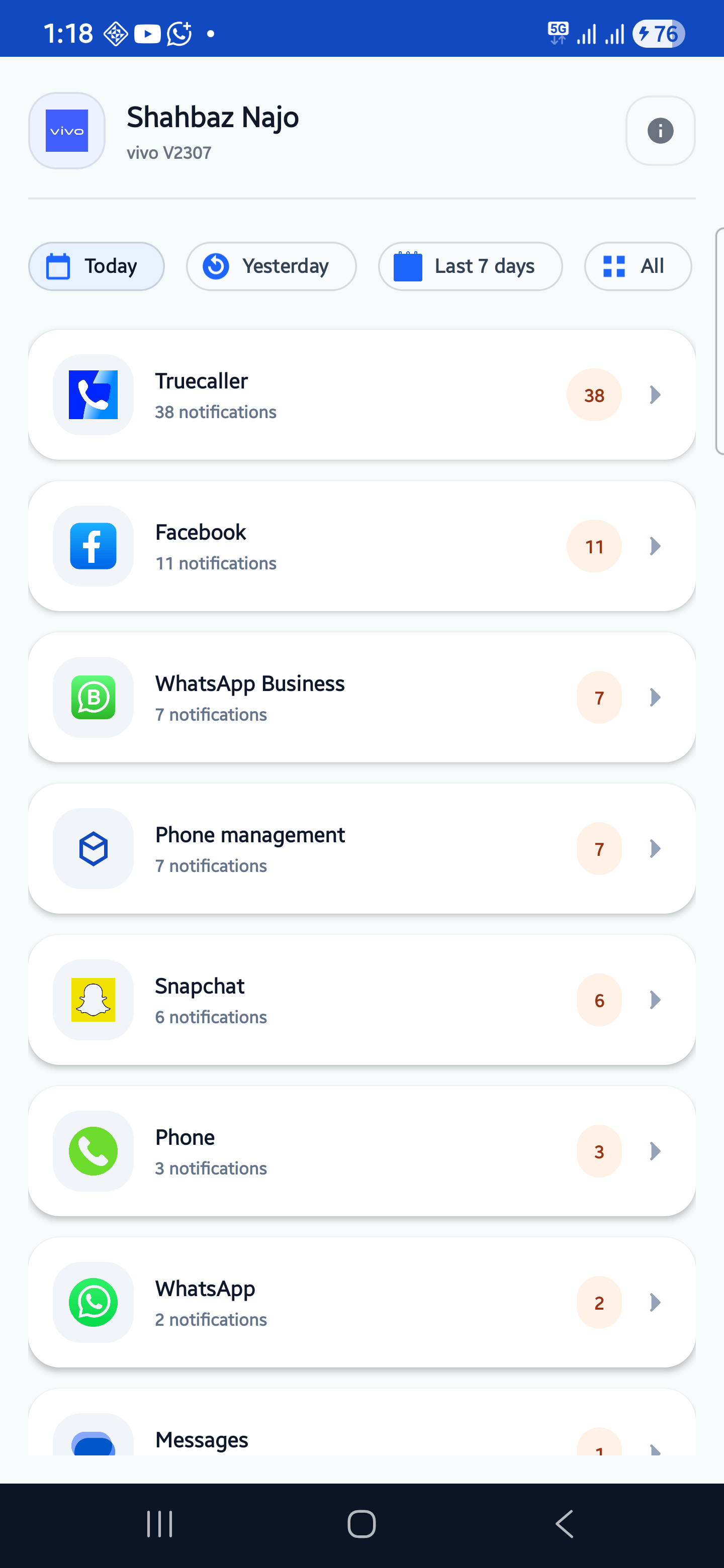
Every notification on your child's phone — WhatsApp, Instagram, Snapchat, games — is mirrored to the parent app. You see the notification they already see. Not a second login.

How notification alerts work →
02 /

Screen Time Tracker for Kids

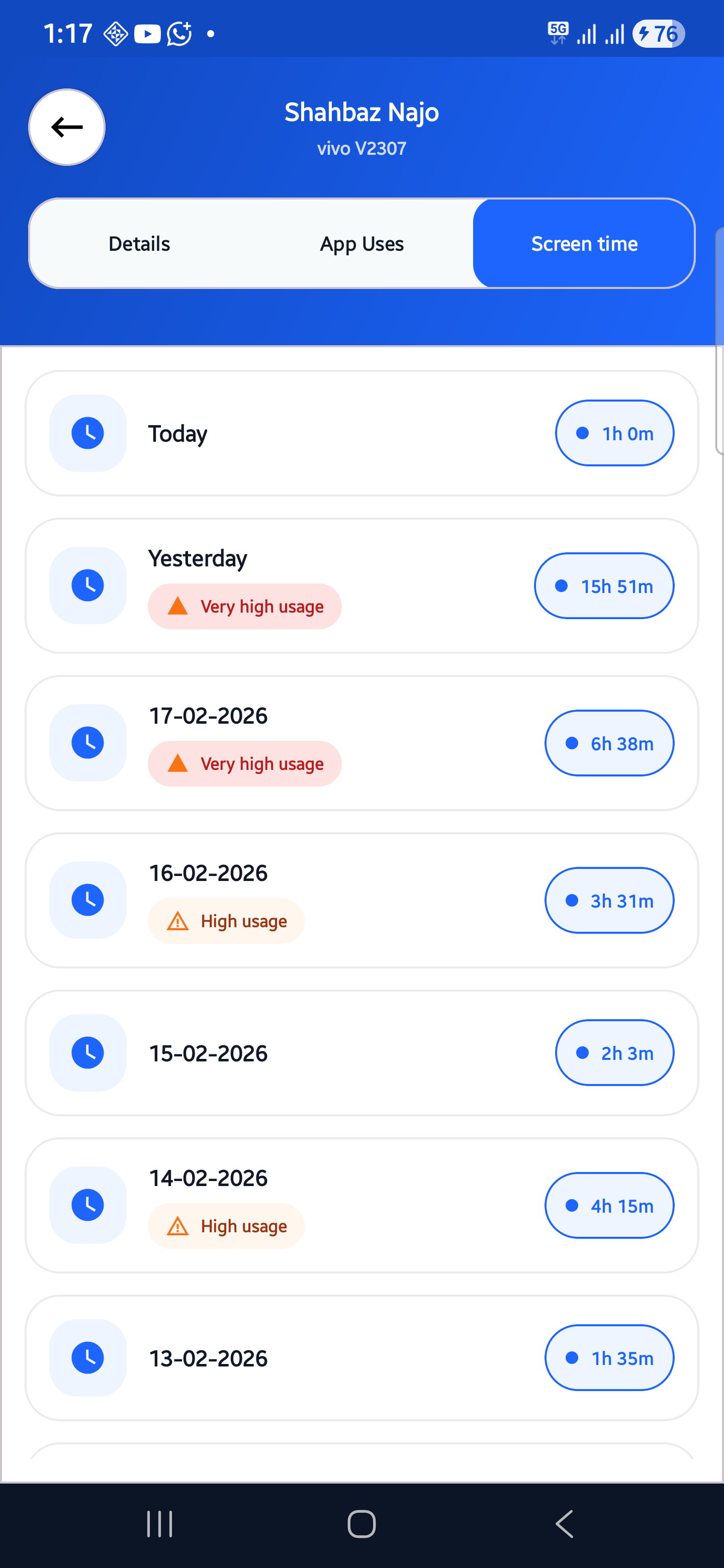
See how long your child spends on their phone, by app, with a 15-day history. This is a report, not an app blocker. Limits stay in Family Link if you use them.

Check screen time from your phone →
03 /

App Usage Tracker

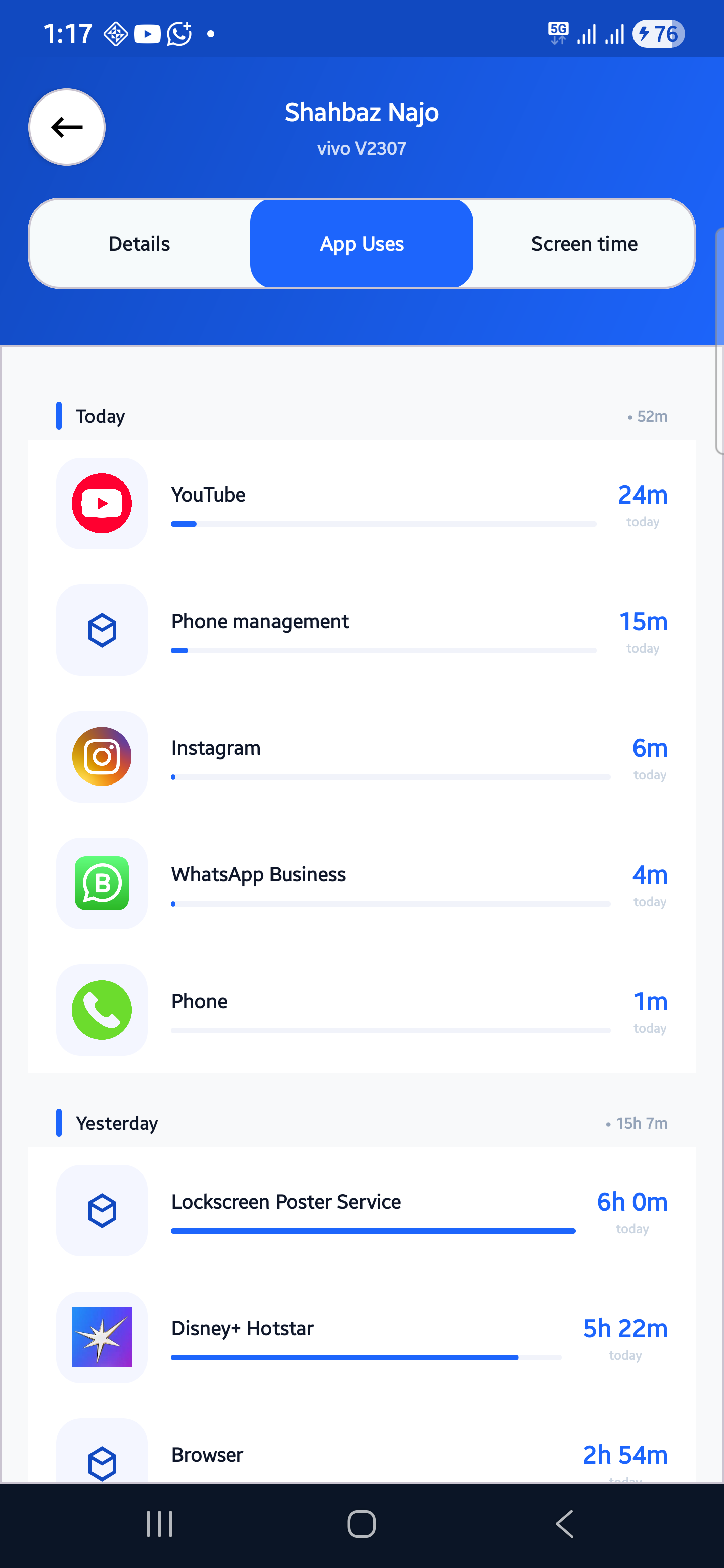
Which apps take the time, ranked for the parent phone. No browsing history and no location.

See the app usage tracker →
05 /

SMS Alerts from Notifications

Message alerts are captured from the SMS notification. We do not read the messaging database or the contact list.

What an SMS alert includes →
06 /

Battery and Online Status

Battery level, and whether the child phone is online, offline, or has notification access turned off.

Battery and online status →
👁️
Visible
Persistent notification on the child phone
🔒
In transit
Encrypted on the way to the parent app
📵
No call log
Calls and SMS come from notifications
🇮🇳
India
Built for Android phones parents here use

Same Notifications
on Two Phones

The moment a notification lands on your child's phone, it appears on yours. WhatsApp, Snapchat, Instagram, calls, SMS — the alert they already see. Any app that posts a notification can show up. There is no separate list of "50 apps," and there is no promised millisecond delay.

Live
As the notification arrives
On screen
Notification text only
In view
Child can see the app

Notification mirror guide →

Notification Mirror screen

How to Connect Your
Child's Phone

Pair in the same room with a 6-digit code. On Xiaomi, Realme, Vivo, and Samsung, allow autostart or the phone will close the app later. Full setup · Indian phone settings

📥

Install App

Download TrueNotification on both the parent's and child's Android devices. Free to install.

🔑

Generate Code

The child's device generates a unique 6-digit pairing code, valid for 10 minutes for security.

🔗

Pair Devices

Enter the code on the parent device. Both devices are now securely linked together.

👁️

Monitor Live

Your parent dashboard goes live. Notifications and usage flow in real time, all day.

Parent Dashboard for
Screen Time and Alerts

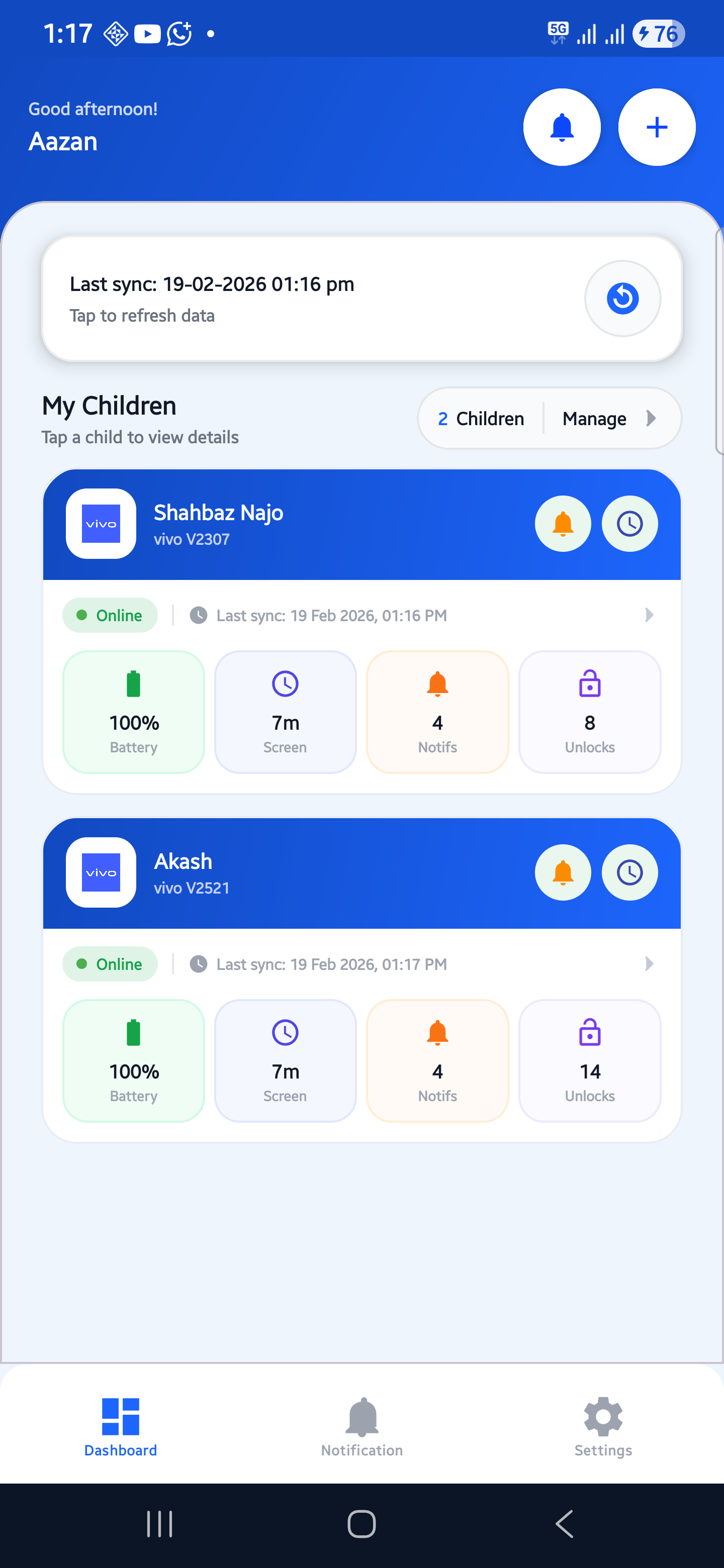
Notifications, screen time, app usage, call and SMS alerts, and battery — one view on the parent phone.

Screen Time View
Parent Dashboard
Activity Log
🛡️ Dashboard
🔔 Notifications
📊 Screen Time
📞 Call & SMS Alerts
🔋 Battery

Start Free.
Upgrade Anytime.

Begin monitoring for free. Upgrade to remove ads and unlock full monitoring power.

Free
₹0/mo
Forever free
  • 1 Child Device
  • Real-time Notifications
  • Basic Screen Time
  • Top 3 Apps Usage
  • Battery Monitor
  • Ads Included
Get Started Free
Monthly
₹149/mo
Cancel anytime
  • Unlimited Child Devices
  • Real-time Notifications
  • Full Screen Time History
  • All App Usage Data
  • Call & SMS Notification Alerts
  • Battery Live Status
  • Ad-Free Experience
  • Priority Support
Start Monthly
Yearly
₹799/yr
Best value · save the most
  • Everything in Quarterly
  • Maximum Savings
  • Ad-Free Experience
  • Priority Support
  • Early Feature Access
  • Family Protection Report
Get Yearly

// No credit card required for free plan · Cancel premium anytime

Transparent Parental Control,
Visible on Your Child's Phone

A search result that calls this app secret monitoring is describing a product we do not ship. The child can see TrueNotification. You install it with them.

No hidden mode

There is no stealth switch. While monitoring is on, Android shows a persistent notification on the child phone. Swiping the app away does not make it invisible.

Consent, then the code

Pairing takes a 6-digit code from the child phone. Do it in the same room. This app is for a parent or guardian and their minor child — not a partner, employee, or any other adult.

Alongside Family Link

Keep Family Link for limits, bedtime, and location. Use TrueNotification when you want the notification itself on your phone. See the comparison.

Parental Control
App Questions

The short list is below. The full FAQ covers WhatsApp, banking notifications, the free plan, and Xiaomi battery settings.

Is TrueNotification spyware?+

No. TrueNotification is a parental control app for a minor child, used by a parent or legal guardian. It runs in the open: the child phone shows a persistent notification while monitoring is on, and there is no hidden or stealth mode. It is not for monitoring a spouse, partner, employee, or any adult.

Does my child know the app is on their phone?+

Yes. While monitoring is active, TrueNotification keeps a persistent system notification on the child device. Talk with your child before you pair. If notification access is turned off, or the app is removed, the parent is told.

How do call and SMS alerts work?+

The parent dashboard does not use the Android call-log or SMS permissions. Call and SMS alerts are taken from notifications the phone already shows. We do not open the call log, the SMS database, or the contact list. A full guide is on the call and SMS alerts page.

How is family data protected?+

Data is encrypted in transit with HTTPS. Passwords are stored as one-way hashes, not as plain text. Notification logs are available only to the paired parent account. We do not sell personal information. Account deletion can be requested in the app or at the delete-account page.

Can I see my child's WhatsApp chats?+

You see the notification WhatsApp already displayed on the child phone: the title and the text WhatsApp placed in that notification. TrueNotification does not log into WhatsApp, and it does not read WhatsApp's private database or older chats. The same rule applies to Instagram, Snapchat, and other apps.

Is TrueNotification a Google Family Link alternative?+

Use them together. Family Link is the right tool for screen-time limits, bedtime, app approval, and location. TrueNotification does none of those. It adds the piece Family Link does not: a live mirror of notifications, plus screen-time and app-usage reports. See the comparison.

Is there a free parental control plan on Android?+

Yes. TrueNotification has a free plan. The free plan shows ads. An optional premium plan, billed by Google Play, removes ads and adds room for more child devices. Current prices are listed on the homepage pricing section and inside the app.

Why do alerts stop on Xiaomi, Realme, or Vivo phones?+

Those brands close background apps to save battery. Allow autostart, set TrueNotification to unrestricted battery, and lock it in recent apps. Notification access and Usage access must stay on. The setup guide lists the menus for Xiaomi, Redmi, Realme, Vivo, and Samsung.

Start Protecting
Your Child Today

Free to download. Setup in 3 minutes. Real-time peace of mind, starting now.

// Free forever plan available · No credit card needed